<?xml version="1.0" encoding="utf-8"?><feed xmlns="http://www.w3.org/2005/Atom" ><generator uri="https://jekyllrb.com/" version="4.3.4">Jekyll</generator><link href="http://luss.io/feed.xml" rel="self" type="application/atom+xml" /><link href="http://luss.io/" rel="alternate" type="text/html" /><updated>2024-12-02T16:04:29+00:00</updated><id>http://luss.io/feed.xml</id><title type="html">LUSS.IO</title><subtitle>Postgres and/or Linux things I always forget.  And...  perhaps other little anecdotes.</subtitle><entry><title type="html">Install Flatpak</title><link href="http://luss.io/linux/2024/12/02/install-flatpak.html" rel="alternate" type="text/html" title="Install Flatpak" /><published>2024-12-02T05:00:00+00:00</published><updated>2024-12-02T05:00:00+00:00</updated><id>http://luss.io/linux/2024/12/02/install-flatpak</id><content type="html" xml:base="http://luss.io/linux/2024/12/02/install-flatpak.html"><![CDATA[<p><img src="/img/flatpak.jpg" alt="flatpak" /></p>

<p>Flatpak is a kewl way to install apps (usually GUI) on linux in a cross-platform way in a sandbox in your
home directory.</p>

<p>Do the below on Ubuntu or Enterprise-linux systems.  Simplest to reboot your system after the install 
so the Flathub Repo is recognized.</p>

<h2 id="on-ubuntu">on Ubuntu</h2>

<figure class="highlight"><pre><code class="language-bash" data-lang="bash"><span class="nb">sudo </span>apt <span class="nb">install </span>flatpak
<span class="nb">sudo </span>apt <span class="nb">install </span>gnome-software-plugin-flatpak
<span class="nb">sudo </span>flatpak remote-add https://dl.flathub.org/repo/flathub.flatpakrepo</code></pre></figure>

<h2 id="on-rocky-or-alama-linux">on Rocky or Alama Linux</h2>

<figure class="highlight"><pre><code class="language-bash" data-lang="bash"><span class="nb">sudo </span>dnf <span class="nb">install </span>flatpak
<span class="nb">sudo </span>flatpak remote-add <span class="nt">--if-not-exists</span> flathub https://dl.flathub.org/repo/flathub.flatpakrepo</code></pre></figure>]]></content><author><name></name></author><category term="linux" /><summary type="html"><![CDATA[]]></summary></entry><entry><title type="html">Using GIT Submodules</title><link href="http://luss.io/linux/2024/12/02/using-git-submodules.html" rel="alternate" type="text/html" title="Using GIT Submodules" /><published>2024-12-02T05:00:00+00:00</published><updated>2024-12-02T05:00:00+00:00</updated><id>http://luss.io/linux/2024/12/02/using-git-submodules</id><content type="html" xml:base="http://luss.io/linux/2024/12/02/using-git-submodules.html"><![CDATA[<p><img src="/img/git-submodules.jpg" alt="git-submodules" /></p>

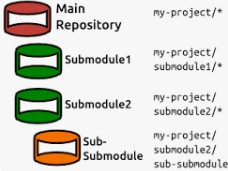
<p>GIT submodules are a nifty way to nest sub-projects under a parent repo.</p>

<figure class="highlight"><pre><code class="language-bash" data-lang="bash"><span class="nv">$ </span>git clone https://github.com/luss/pgbin
Cloning into <span class="s1">'pgbin'</span>...
warning: You appear to have cloned an empty repository.

<span class="nv">$ </span><span class="nb">cd </span>pgbin
<span class="nv">$ </span>git submodule add https://github.com/pgedge/pgbin-build build
Cloning into <span class="s1">'/home/denisl/dev/pgbin/build'</span>...
remote: Enumerating objects: 1004, <span class="k">done</span><span class="nb">.</span>
remote: Counting objects: 100% <span class="o">(</span>106/106<span class="o">)</span>, <span class="k">done</span><span class="nb">.</span>
remote: Compressing objects: 100% <span class="o">(</span>18/18<span class="o">)</span>, <span class="k">done</span><span class="nb">.</span>
remote: Total 1004 <span class="o">(</span>delta 93<span class="o">)</span>, reused 92 <span class="o">(</span>delta 85<span class="o">)</span>, pack-reused 898 <span class="o">(</span>from 1<span class="o">)</span>
Receiving objects: 100% <span class="o">(</span>1004/1004<span class="o">)</span>, 151.81 KiB | 6.07 MiB/s, <span class="k">done</span><span class="nb">.</span>
Resolving deltas: 100% <span class="o">(</span>480/480<span class="o">)</span>, <span class="k">done</span><span class="nb">.</span>

<span class="nv">$ </span>git submodule add https://github.com/pgedge/cli cli
Cloning into <span class="s1">'/home/denisl/dev/pgbin/cli'</span>...
remote: Enumerating objects: 24771, <span class="k">done</span><span class="nb">.</span>
remote: Counting objects: 100% <span class="o">(</span>911/911<span class="o">)</span>, <span class="k">done</span><span class="nb">.</span>
remote: Compressing objects: 100% <span class="o">(</span>258/258<span class="o">)</span>, <span class="k">done</span><span class="nb">.</span>
remote: Total 24771 <span class="o">(</span>delta 666<span class="o">)</span>, reused 880 <span class="o">(</span>delta 644<span class="o">)</span>, pack-reused 23860 <span class="o">(</span>from 1<span class="o">)</span>
Receiving objects: 100% <span class="o">(</span>24771/24771<span class="o">)</span>, 99.24 MiB | 39.67 MiB/s, <span class="k">done</span><span class="nb">.</span>
Resolving deltas: 100% <span class="o">(</span>15571/15571<span class="o">)</span>, <span class="k">done</span><span class="nb">.</span>

<span class="nv">$ </span>git status
On branch main

No commits yet

Changes to be committed:
	new file:   .gitmodules
	new file:   build
	new file:   cli

<span class="nv">$ </span>git add <span class="nb">.</span>
<span class="nv">$ </span>git commit <span class="nt">-m</span> <span class="s1">'a sample repo with two submodules'</span>
<span class="o">[</span>main <span class="o">(</span>root-commit<span class="o">)</span> 9eda051] a sample repo with two submodules
 3 files changed, 8 insertions<span class="o">(</span>+<span class="o">)</span>
 create mode 100644 .gitmodules
 create mode 160000 build
 create mode 160000 cli

<span class="nv">$ </span>git push
Enumerating objects: 3, <span class="k">done</span><span class="nb">.</span>
Counting objects: 100% <span class="o">(</span>3/3<span class="o">)</span>, <span class="k">done</span>.</code></pre></figure>

<p>In older versions of the Git CLI, when you pull the repo you’ll need to
run the below command (newer versions do this automagically) or your submodule
directories will be empty:</p>

<figure class="highlight"><pre><code class="language-bash" data-lang="bash">git submodule update <span class="nt">--init</span> <span class="nt">--recursive</span></code></pre></figure>]]></content><author><name></name></author><category term="linux" /><summary type="html"><![CDATA[]]></summary></entry><entry><title type="html">Timely Calendar Versioning</title><link href="http://luss.io/linux/2024/12/01/timely-calendar-versioning.html" rel="alternate" type="text/html" title="Timely Calendar Versioning" /><published>2024-12-01T05:00:00+00:00</published><updated>2024-12-01T05:00:00+00:00</updated><id>http://luss.io/linux/2024/12/01/timely-calendar-versioning</id><content type="html" xml:base="http://luss.io/linux/2024/12/01/timely-calendar-versioning.html"><![CDATA[<p><img src="/img/calver.jpg" alt="calver" /></p>

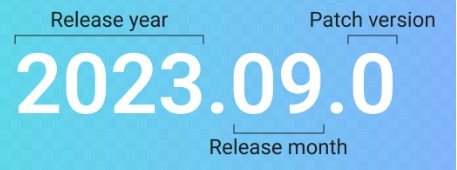
<p><a href="https://calver.org">CalVer</a> is a versioning convention based on your project’s release calendar, 
instead of <a href="https://semver.org">SemVer’s</a> arbitrary numbers.  As an example, Ubuntu uses a short 
year and a zero padded month for it’s main version ala <em>24.04</em> is their latests LTS release 
from April of 2024.</p>]]></content><author><name></name></author><category term="linux" /><summary type="html"><![CDATA[]]></summary></entry><entry><title type="html">Set Timezone</title><link href="http://luss.io/linux/2024/11/30/set-timezone.html" rel="alternate" type="text/html" title="Set Timezone" /><published>2024-11-30T05:00:00+00:00</published><updated>2024-11-30T05:00:00+00:00</updated><id>http://luss.io/linux/2024/11/30/set-timezone</id><content type="html" xml:base="http://luss.io/linux/2024/11/30/set-timezone.html"><![CDATA[<p><img src="/img/time-zones.jpg" alt="time-zones" /></p>

<figure class="highlight"><pre><code class="language-bash" data-lang="bash"><span class="nv">$ </span><span class="nb">sudo </span>timedatectl set-timezone America/New_York</code></pre></figure>

<p>To figure out the time zone in Paris use  the following command:</p>

<figure class="highlight"><pre><code class="language-bash" data-lang="bash"><span class="nv">$ </span>timedatectl list time-zones | <span class="nb">grep</span> <span class="nt">-i</span> paris
Europe/Paris</code></pre></figure>]]></content><author><name></name></author><category term="linux" /><summary type="html"><![CDATA[]]></summary></entry><entry><title type="html">Install Jekyll</title><link href="http://luss.io/linux/2024/11/26/install-jekyll.html" rel="alternate" type="text/html" title="Install Jekyll" /><published>2024-11-26T17:26:00+00:00</published><updated>2024-11-26T17:26:00+00:00</updated><id>http://luss.io/linux/2024/11/26/install-jekyll</id><content type="html" xml:base="http://luss.io/linux/2024/11/26/install-jekyll.html"><![CDATA[<p><img src="/img/ruby-jekyll.png" alt="ruby-jekyll" /></p>

<p>I’m using Jekyll and it’s default Minima Theme for this blog site to KeepItSimple:</p>

<figure class="highlight"><pre><code class="language-bash" data-lang="bash"><span class="nb">sudo </span>apt-get <span class="nb">install </span>ruby-full build-essential zlib1g-dev

<span class="nb">echo</span> <span class="s1">'# Install Ruby Gems to ~/gems'</span> <span class="o">&gt;&gt;</span> ~/.bashrc
<span class="nb">echo</span> <span class="s1">'export GEM_HOME="$HOME/gems"'</span> <span class="o">&gt;&gt;</span> ~/.bashrc
<span class="nb">echo</span> <span class="s1">'export PATH="$HOME/gems/bin:$PATH"'</span> <span class="o">&gt;&gt;</span> ~/.bashrc
<span class="nb">source</span> ~/.bashrc

gem <span class="nb">install </span>jekyll bundler

<span class="c">## necessary for using MINIMA</span>
gem <span class="nb">install </span>minima jekyll-feed addressable i18n webrick jekyll-seo-tag public_suffix concurrent-ruby bigdecimal rake</code></pre></figure>]]></content><author><name></name></author><category term="linux" /><summary type="html"><![CDATA[]]></summary></entry><entry><title type="html">Cleaning APT Cache</title><link href="http://luss.io/linux/2024/11/26/cleaning-APT-cache.html" rel="alternate" type="text/html" title="Cleaning APT Cache" /><published>2024-11-26T12:14:00+00:00</published><updated>2024-11-26T12:14:00+00:00</updated><id>http://luss.io/linux/2024/11/26/cleaning-APT-cache</id><content type="html" xml:base="http://luss.io/linux/2024/11/26/cleaning-APT-cache.html"><![CDATA[<p><img src="/img/clean-apt-cache.jpg" alt="clean-apt-cache" /></p>

<figure class="highlight"><pre><code class="language-bash" data-lang="bash"><span class="nb">sudo </span>apt-get purge PACKAGE</code></pre></figure>

<figure class="highlight"><pre><code class="language-bash" data-lang="bash"><span class="nb">sudo </span>apt-get clean</code></pre></figure>]]></content><author><name></name></author><category term="linux" /><summary type="html"><![CDATA[]]></summary></entry><entry><title type="html">Installing Docker CE on EL &amp;amp; Ubuntu</title><link href="http://luss.io/linux/2024/09/14/install-docker-CE.html" rel="alternate" type="text/html" title="Installing Docker CE on EL &amp;amp; Ubuntu" /><published>2024-09-14T05:00:00+00:00</published><updated>2024-09-14T05:00:00+00:00</updated><id>http://luss.io/linux/2024/09/14/install-docker-CE</id><content type="html" xml:base="http://luss.io/linux/2024/09/14/install-docker-CE.html"><![CDATA[<p><img src="/img/docker-ce.jpg" alt="docker-ce" /></p>

<p>on EL based systems:</p>

<figure class="highlight"><pre><code class="language-bash" data-lang="bash"><span class="nb">sudo </span>yum <span class="nb">install</span> <span class="nt">-y</span> yum-utils device-mapper-persistent-data lvm2
<span class="nb">sudo </span>yum-config-manager <span class="nt">--add-repo</span> https://download.docker.com/linux/centos/docker-ce.repo
<span class="nb">sudo </span>yum <span class="nb">install</span> <span class="nt">-y</span> docker-ce docker-ce-cli containerd.io

<span class="nb">sudo </span>systemctl <span class="nb">enable </span>docker
<span class="nb">sudo </span>systemctl start docker
<span class="nb">sudo </span>usermod <span class="nt">-aG</span> docker <span class="nv">$USER</span></code></pre></figure>

<p>on Debian/Ubuntu based systems:</p>

<figure class="highlight"><pre><code class="language-bash" data-lang="bash"><span class="nb">sudo </span>apt-get <span class="nt">-y</span> update
<span class="nb">sudo </span>apt-get <span class="nb">install</span> <span class="nt">-y</span> ca-certificates curl
<span class="nb">sudo install</span> <span class="nt">-m</span> 0755 <span class="nt">-d</span> /etc/apt/keyrings
<span class="nb">sudo </span>curl <span class="nt">-fsSL</span> https://download.docker.com/linux/ubuntu/gpg <span class="nt">-o</span> /etc/apt/keyrings/docker.asc
<span class="nb">sudo chmod </span>a+r /etc/apt/keyrings/docker.asc

<span class="c"># Add the repository to Apt sources:</span>
<span class="nb">echo</span> <span class="s2">"deb [arch=</span><span class="si">$(</span>dpkg <span class="nt">--print-architecture</span><span class="si">)</span><span class="s2"> signed-by=/etc/apt/keyrings/docker.asc] https://download.docker.com/linux/ubuntu </span><span class="se">\</span><span class="s2">
</span><span class="si">$(</span><span class="nb">.</span> /etc/os-release <span class="o">&amp;&amp;</span> <span class="nb">echo</span> <span class="s2">"</span><span class="nv">$VERSION_CODENAME</span><span class="s2">"</span><span class="si">)</span><span class="s2"> stable"</span> | <span class="se">\</span>
<span class="nb">sudo tee</span> /etc/apt/sources.list.d/docker.list <span class="o">&gt;</span> /dev/null
<span class="nb">sudo </span>apt-get update <span class="nt">-y</span>

<span class="nb">sudo </span>apt-get <span class="nb">install</span> <span class="nt">-y</span> docker-ce docker-ce-cli
<span class="nb">sudo </span>apt-get <span class="nb">install</span> <span class="nt">-y</span> containerd.io docker-buildx-plugin docker-compose-plugin</code></pre></figure>]]></content><author><name></name></author><category term="linux" /><summary type="html"><![CDATA[]]></summary></entry><entry><title type="html">Podman Rising</title><link href="http://luss.io/linux/2024/05/25/podman-rising.html" rel="alternate" type="text/html" title="Podman Rising" /><published>2024-05-25T17:00:00+00:00</published><updated>2024-05-25T17:00:00+00:00</updated><id>http://luss.io/linux/2024/05/25/podman-rising</id><content type="html" xml:base="http://luss.io/linux/2024/05/25/podman-rising.html"><![CDATA[<p><img src="/img/podman-rocks.jpg" alt="podman-rocks" /></p>

<p>Podman is <a href="https://dev.to/ujjawaltyagi/docker-alternative-podman-on-rise-the-future-of-devops-31i2">on the rise</a> for sure.</p>

<p>Use a recent version of Linux (such as EL9 or Ubuntu 24.04) to do the install.</p>

<figure class="highlight"><pre><code class="language-bash" data-lang="bash"><span class="nb">sudo </span>yum <span class="nb">install </span>podman podman-compose</code></pre></figure>

<p>or</p>

<figure class="highlight"><pre><code class="language-bash" data-lang="bash">apt <span class="nb">install </span>podman podman-compose</code></pre></figure>

<p>The new <a href="https://podman-desktop.io/">Podman Desktop</a> is pretty kewl also.</p>]]></content><author><name></name></author><category term="linux" /><summary type="html"><![CDATA[]]></summary></entry><entry><title type="html">Forking a GIT Repo with all Branches</title><link href="http://luss.io/linux/2023/11/15/forking-a-repo-with-all-branches.html" rel="alternate" type="text/html" title="Forking a GIT Repo with all Branches" /><published>2023-11-15T17:00:00+00:00</published><updated>2023-11-15T17:00:00+00:00</updated><id>http://luss.io/linux/2023/11/15/forking-a-repo-with-all-branches</id><content type="html" xml:base="http://luss.io/linux/2023/11/15/forking-a-repo-with-all-branches.html"><![CDATA[<p><img src="/img/forking-a-repo.jpg" alt="forking-a-repo" /></p>

<figure class="highlight"><pre><code class="language-bash" data-lang="bash">git clone <span class="nt">--mirror</span> git@myhost:mybackup.git mybackup/.git
<span class="nb">cd </span>mybackup
git config <span class="nt">--bool</span> core.bare <span class="nb">false</span></code></pre></figure>]]></content><author><name></name></author><category term="linux" /><summary type="html"><![CDATA[]]></summary></entry><entry><title type="html">Cleaning YUM Cache</title><link href="http://luss.io/linux/2023/11/14/cleaning-up-yum-cache.html" rel="alternate" type="text/html" title="Cleaning YUM Cache" /><published>2023-11-14T17:00:00+00:00</published><updated>2023-11-14T17:00:00+00:00</updated><id>http://luss.io/linux/2023/11/14/cleaning-up-yum-cache</id><content type="html" xml:base="http://luss.io/linux/2023/11/14/cleaning-up-yum-cache.html"><![CDATA[<p><img src="/img/clean-yum-cache.jpg" alt="clean-yum-cache" /></p>

<figure class="highlight"><pre><code class="language-bash" data-lang="bash"><span class="nb">sudo </span>yum clean packages
<span class="nb">sudo </span>yum clean metadata
<span class="nb">sudo </span>yum clean dbcache
<span class="nb">sudo </span>yum clean all
<span class="nb">sudo </span>yum makecache</code></pre></figure>]]></content><author><name></name></author><category term="linux" /><summary type="html"><![CDATA[]]></summary></entry></feed>